
NOVUS LogBox Connect Multichannel Wireless Data Logger
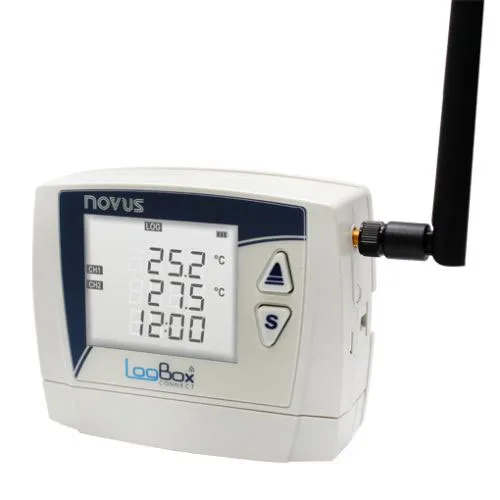
A family of multichannel data loggers that record analogue and digital signals and send them on by Bluetooth, Wi-Fi or cellular, running on AA batteries or an external supply.
Key Features of the LogBox Connect
Universal analogue inputs
Thermocouples J, K, T, N, E, R, S and B, Pt100, 0 to 50 mV, 0 to 5 V, 0 to 10 V, 0 to 20 mA and 4 to 20 mA.
Digital input and output
One digital input for pulse counting, event recording or logger start, and one output for an alarm or electronic switch.
Large memory
140,000 records at 15-bit resolution.
Bluetooth or Wi-Fi
LogBox BLE: Bluetooth 4.1 and USB.
LogBox Wi-Fi: 802.11 b/g/n, Modbus TCP, MQTT and USB.
Battery operation
4 AA alkaline batteries with a typical autonomy of 2 years without Wi-Fi, or an external 10 to 30 Vdc supply.
App configuration
NXperience on Windows, or NXperience Mobile on Android and iOS.
LogBox Connect Technical Specifications
Tap a group to filter the wireless data logger specifications, or show them all.
- 140,000Recordsmemory
- 15 bitResolution
- 2 yearsBattery lifetypical, 4 AA, without Wi-Fi
- IP40Protection
| Specification | Details |
|---|---|
| Input types | Thermocouples J, K, T, N, E, R, S, B; Pt100; 0 to 50 mV; 0 to 5 V; 0 to 10 V; 0 to 20 mA; 4 to 20 mA |
| Internal sensors | NTC temperature, battery voltage, external power supply |
| Resolution and memory | 15 bits; 140,000 records |
| Digital input | 1 (pulse count, event record or logger start) |
| Output | BLE and Wi-Fi: 1 PNP output (electronic switch or alarm) |
| Communication | BLE: Bluetooth 4.1, USB; Wi-Fi: 802.11 b/g/n, Modbus TCP, MQTT, USB; cellular version: NOVUS Cloud and SCADA |
| Configuration | NXperience (Windows); NXperience Mobile (Android and iOS) |
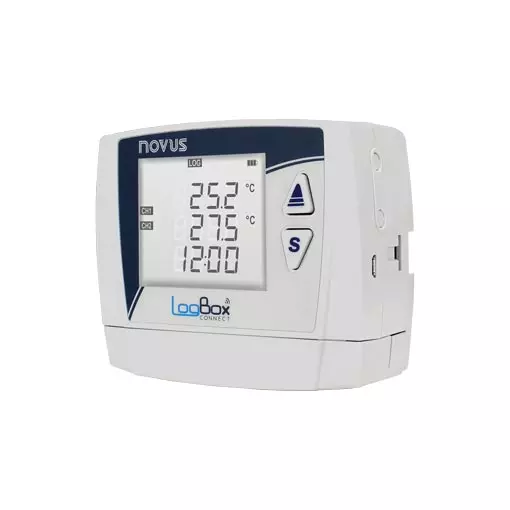
| Dimensions | 120 x 100 x 40 mm |
| Power supply | 4 AA alkaline batteries (typical autonomy 2 years, without Wi-Fi) or 10 to 30 Vdc |
| Operating temperature | With external supply -20 to 70 °C; with AA batteries -10 to 50 °C (BLE and Wi-Fi) |
| Protection | IP40 |
Figures from the NOVUS LogBox Connect brochure, for the BLE and Wi-Fi models. Input count differs by model, so confirm the version for your application before ordering.
Download BrochureHow does the LogBox Connect work?
Tap a step, or let it run, to follow the signal from the field to the control system.
Step by step:
LogBox runs on its own batteries where there is no power, logging until you collect the data by phone or USB. The Wi-Fi version publishes readings live over Modbus TCP or MQTT.
Where the LogBox Connect is used
Typical applications for this wireless data logger, from the manufacturer's documentation.
- 01Cold chainTemperature records for refrigerated storage and transport.
- 02LaboratoriesRecording of conditions and test signals.
- 03Data centresMonitoring of room conditions.
- 04Distribution centresMonitoring of stored goods.
- 05Utility servicesLogging at remote utility sites.
- 06Agricultural greenhousesMonitoring of growing conditions.
How the LogBox Connect compares
Other data acquisition and iiot in our range. The highlighted row is this product. Tap any other name to open its page.
| Product | Type | Signals | Outputs and communication | Supply | Mounting |
|---|---|---|---|---|---|
| NOVUS Cloud IIoT Platform | IIoT cloud platform | Data from NOVUS devices | Dashboards, email and SMS alarms | Hosted platform | Online |
| NOVUS FieldLogger Data Logger | Data logger | 8 universal analogue, 8 digital I/O | RS485 Modbus RTU, Ethernet, Modbus TCP, USB | 100 to 240 Vac | Panel |
| NOVUS LogBox Connect Wireless Data Logger | Wireless data logger | Universal analogue, 1 digital | Bluetooth, Wi-Fi with Modbus TCP and MQTT, USB | 4 AA batteries or 10 to 30 Vdc | Wall or field, IP40 |
From Selection to a Working Signal in Your Control System
A field signal is only as useful as the value that reaches the control room. Proplant PCE handles the configuration, panel work and integration around the device as well as the device itself.
Application review
We check the signals, channel count, network and mounting before recommending a device.
Supply
Instruments and modules from the brands on this page, with the brochure for your engineering file.
Configuration and installation
Ranges, alarms, addresses and network settings set up, then panel building, cabling and termination by our E&I team.
Integration
Mapping into your PLC, SCADA or historian, and testing until the value on screen matches the field.
What to tell us so we can recommend a device
Tick off what you already know. We will check the LogBox Connect against your application, or suggest a better fit from our range.
Other automation products to consider
LogBox Connect FAQ
What is LogBox Connect?
A NOVUS family of multichannel data loggers that record analogue and digital signals and send them by Bluetooth, Wi-Fi or cellular.
Which signals can it log?
Thermocouples J, K, T, N, E, R, S and B, Pt100, mV, 0 to 5 V, 0 to 10 V and 0 to 20 or 4 to 20 mA, plus a digital input.
How long do the batteries last?
Typically 2 years on 4 AA alkaline batteries without Wi-Fi. An external 10 to 30 Vdc supply is also possible.
How much can it store?
140,000 records.
Can the Wi-Fi version connect to SCADA?
Yes. It supports Modbus TCP and MQTT over 802.11 b/g/n.
Can Proplant PCE help me choose the right automation device?
Yes. Send us the signals, channel count, network and mounting, and our team will recommend a suitable device and set it up for your system.
Let's Discuss Your Automation Project
Tell us what signals you need to bring in, where the device sits and what system it reports to. We will come back with a recommendation and the brochure.