
NOVUS TxBlock-USB Head-Mount and TxRail-USB DIN Rail Temperature Transmitters
High-precision temperature transmitters with a universal input and a USB port for configuration, calibration and online monitoring: TxBlock-USB for the sensor head and TxRail-USB for the DIN rail.
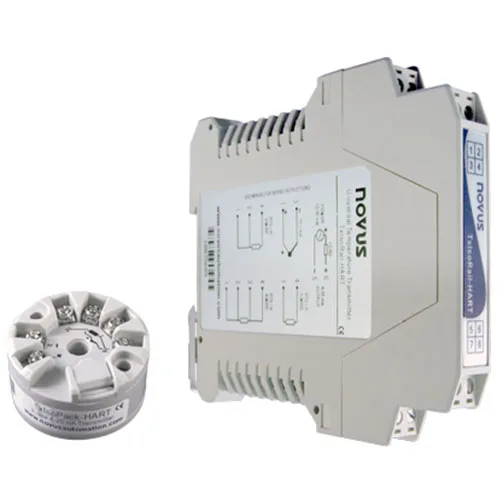
Key Features of the TxBlock-USB and TxRail-USB
Universal input
Thermocouples J, K, T, E, N, R, S and B, Pt100, Pt1000, NTC and 0 to 50 mV, with Pt100 and Pt1000 in 2, 3 or 4 wires.
Configurable range
Set the measurement range to suit the process, with the output linearised to the measured temperature.
NAMUR NE43 sensor break
Sensor break detection follows the NAMUR NE43 recommendation, so a broken sensor is not mistaken for a real reading.
Two mounting styles
TxBlock-USB in the sensor head (43.5 x 20.5 mm).
TxRail-USB on a DIN rail (99.5 x 114 x 12.5 mm).
4 to 20 mA or 0 to 10 V
TxBlock-USB gives loop-powered 4 to 20 mA.
TxRail-USB is configurable for 4 to 20 mA or 0 to 10 V.
USB port
A USB Micro-B port and the free TxConfig II software for configuration, calibration and online monitoring in the lab or the field.
TxBlock-USB and TxRail-USB Technical Specifications
Tap a group to filter the temperature transmitter specifications, or show them all.
- 0.1 % of spanTypical accuracyat 25 °C
- 4 to 20 mA / 0 to 10 VOutput0 to 10 V on TxRail-USB
- 8 to 35 VdcSupplyTxBlock-USB
- -40 to 85 °COperating temperature
| Specification | Details |
|---|---|
| Inputs | Thermocouples J, K, T, E, N, R, S, B; Pt100; Pt1000; NTC; 0 to 50 mV |
| Measurement range | Configurable |
| Sensor connection | Pt100 and Pt1000: 2, 3 and 4 wires |
| Cold junction | Internal compensation |
| Sensor break detection | According to NAMUR NE43 |
| Accuracy | Typical 0.1 % of span at 25 °C for thermocouple, mV, Pt100 and Pt1000 |
| Temperature effect | < ±0.16 % at 25 °C |
| Output, TxBlock-USB | Loop-powered 4 to 20 mA |
| Output, TxRail-USB | Configurable: loop-powered 4 to 20 mA or 0 to 10 V |
| Output linearisation and resolution | Linearised to the measured temperature; 2 µA (4 to 20 mA), 2.5 mV (0 to 10 V) |
| Configuration | USB Micro-B port, USB class CDC; free TxConfig II software for Windows |
| Mounting | TxBlock-USB: sensor head; TxRail-USB: DIN rail |
| Dimensions | TxBlock-USB 43.5 mm diameter x 20.5 mm; TxRail-USB 99.5 x 114 x 12.5 mm |
| Supply, TxBlock-USB | 8 to 35 Vdc |
| Supply, TxRail-USB | 10 to 35 Vdc (4 to 20 mA output); 12 to 30 Vdc (0 to 10 V output) |
| Operating temperature | -40 to 85 °C |
Figures from the NOVUS Automation brochure. Confirm the version and options for your application before ordering.
Download BrochureHow does the TxBlock-USB and TxRail-USB work?
Tap a step, or let it run, to follow the signal from the process to the control system.
Step by step:
Both versions do the same job in a different place: TxBlock-USB in the sensor head close to the measurement, TxRail-USB in the panel. A broken sensor drives the output to the NAMUR NE43 fault level, so the control system can tell a fault from a real temperature.
Where the TxBlock-USB and TxRail-USB is used
Typical applications for this temperature transmitter, from the manufacturer's documentation.
- 01Head-mount installationsTxBlock-USB in the connection head of an RTD or thermocouple assembly.
- 02Panel and DIN rail installationsTxRail-USB in the control panel, with a 4 to 20 mA or 0 to 10 V output.
- 03Laboratory and field set-upConfiguration, calibration and online monitoring over USB, in the lab or on site.
How the TxBlock-USB and TxRail-USB compares
The highlighted row is this instrument. Tap any other name to open its page.
| Instrument | Type | Input | Output | Supply | Mounting |
|---|---|---|---|---|---|
| ACS Thermocont TS4S Temperature Switch | Temperature switch | Pt100 class A, built in | 2x PNP switch, 4 to 20 mA option | 10.5 to 35 VDC | G½" or G¼" thread, compression fitting |
| Datexel DAT 1066 Head-Mount Temperature Transmitter | Head-mount transmitter, isolated | RTD, thermocouple, mV, resistance | 4 to 20 mA | 7 to 32 Vdc | DIN B head, DIN rail kit |
| NOVUS TxBlock-USB and TxRail-USB Temperature Transmitters | Head-mount or DIN rail transmitter | Thermocouple, Pt100, Pt1000, NTC, mV | 4 to 20 mA; 0 to 10 V on TxRail-USB | 8 to 35 Vdc (TxBlock-USB) | Sensor head or DIN rail |
| NOVUS TxIsoPack-USB Isolated Temperature Transmitter | Head-mount transmitter, isolated | Pt100, thermocouple, mV | 4 to 20 mA or 20 to 4 mA | 12 to 35 Vdc | Sensor head |
| NOVUS TxMini Compact Temperature Transmitter | Compact transmitter | Pt100 or Pt1000, 3-wire | 4 to 20 mA | 8 to 35 Vdc | M12 or DIN 43650 connector |
| NOVUS RHT-Air Wireless Temperature and Humidity Transmitter | Wireless transmitter | Built-in temperature and humidity sensors | Wireless to AirGate-Modbus | Battery or 10 to 35 Vdc | Wall mount or probe extension |
From Selection to a Working Signal in Your Control System
A temperature reading is only as useful as the signal that reaches the control room. Proplant PCE handles the steps around the instrument as well as the instrument itself.
Application review
We check the process temperature, sensor type, mounting and the signal your control system needs before recommending a transmitter.
Supply
Transmitters, switches and sensors from the brands on this page, with the brochure for your engineering file.
Configuration and installation
Range, sensor type and failure behaviour set before delivery, then mounting, cabling and termination by our E&I team.
Integration
Loop wiring and scaling in your PLC or SCADA, so the temperature on screen matches the process.
What to tell us so we can recommend an instrument
Tick off what you already know. We will check the TxBlock-USB and TxRail-USB against your conditions, or suggest a better fit from our range.
Other temperature instruments to consider
TxBlock-USB and TxRail-USB FAQ
What is the difference between TxBlock-USB and TxRail-USB?
TxBlock-USB mounts in the sensor head and gives a loop-powered 4 to 20 mA output. TxRail-USB mounts on a DIN rail and can give 4 to 20 mA or 0 to 10 V.
Which sensors do they accept?
Thermocouples J, K, T, E, N, R, S and B, Pt100 and Pt1000 in 2, 3 or 4 wires, NTC sensors and 0 to 50 mV signals.
How accurate are they?
Typical accuracy is 0.1 % of span at 25 °C for thermocouple, mV, Pt100 and Pt1000 inputs.
How are they configured?
Through the USB Micro-B port with a standard cable and the free TxConfig II software for Windows. No extra interface or converter is needed.
What happens if the sensor breaks?
Sensor break detection follows NAMUR NE43, so the output moves to a fault level the control system can recognise.
Can Proplant PCE help me choose the right temperature transmitter?
Yes. Send us the sensor type, temperature range, mounting and the output your control system needs, and our team will recommend a suitable instrument.
Let's Discuss Your Temperature Application
Tell us what you are measuring, where the sensor sits and what the signal needs to do. We will come back with a recommendation and the brochure.